
Introduction to Cloud Computing
What is Cloud Computing?
Cloud Computing is a technology that allows users to store, manage, and process data over the internet instead of using local computers or physical servers. It provides on-demand access to computing resources such as storage, servers, databases, networking, and software through remote cloud service providers. Users can access these services anytime and anywhere using an internet connection.
Importance of Cloud Technology in the Modern Digital Era
Cloud technology has become essential in today’s digital world because it offers flexibility, scalability, and cost efficiency. Organizations no longer need to invest heavily in physical infrastructure, as cloud services provide scalable resources based on demand.
The importance of cloud computing includes:
- Reducing IT infrastructure costs
- Enabling remote access to data and applications
- Improving collaboration and productivity
- Enhancing data storage and backup solutions
- Supporting innovation through advanced technologies like AI and big data
How Cloud Computing is Changing the IT Industry
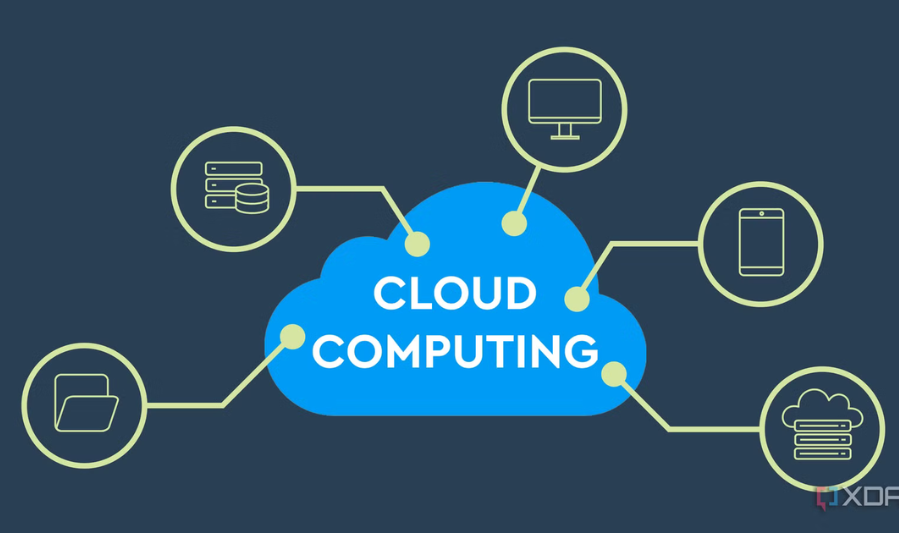
Cloud computing has transformed the IT industry by shifting traditional computing models to cloud-based services. Instead of relying on physical servers and in-house data centers, companies now use cloud platforms to deploy applications and manage data more efficiently.
This transformation has led to:
- Faster deployment of applications and services
- Increased scalability and performance
- Growth of Software-as-a-Service (SaaS), Platform-as-a-Service (PaaS), and Infrastructure-as-a-Service (IaaS)
- Increased adoption of remote work and digital collaboration tools
- Greater focus on cybersecurity and cloud-native development
Overall, cloud computing is reshaping how IT systems are built, managed, and delivered, making technology more accessible and efficient.
History of Cloud Computing
Early Computing Systems and Data Centers
Mainframe Era
The origins of cloud computing can be traced back to the early days of computing in the 1960s, when organizations used large mainframe computers to process and store data. These systems were extremely expensive and required centralized control, meaning multiple users accessed a single powerful computer through terminals.
Early Data Centers
As computing needs grew, organizations began building data centers to store and manage large amounts of information. These data centers were physically maintained and required significant investment in hardware, cooling, and maintenance.
Time-Sharing Systems
During this period, time-sharing systems were introduced, allowing multiple users to access computing resources simultaneously. This concept laid the foundation for the idea of shared computing resources, which is central to cloud computing today.
Evolution of Virtualization Technology
Introduction of Virtualization
Virtualization emerged as a key technology in the 1970s, allowing a single physical machine to run multiple virtual machines. This improved resource utilization and reduced hardware costs.
Advancements in Virtual Machines
In the 1990s and early 2000s, virtualization technology became more advanced and widely adopted in enterprise environments. It enabled better scalability, flexibility, and isolation of computing environments.
Role in Cloud Computing
Virtualization became the backbone of cloud computing by allowing cloud providers to efficiently allocate and manage computing resources across multiple users and applications.
Growth of Internet-Based Services and Modern Cloud Platforms
Rise of the Internet
The rapid growth of the internet in the late 1990s and early 2000s enabled services to move from local systems to online platforms. This shift made remote access to data and applications possible on a large scale.
Emergence of Cloud Services
Companies began offering computing resources over the internet, leading to the development of cloud computing models such as Software-as-a-Service (SaaS), Platform-as-a-Service (PaaS), and Infrastructure-as-a-Service (IaaS).
Modern Cloud Platforms
Today, major providers such as Amazon Web Services, Microsoft Azure, and Google Cloud dominate the cloud industry. These platforms offer scalable computing power, storage, artificial intelligence tools, and global infrastructure.
Impact of Modern Cloud Computing
Modern cloud computing has transformed how businesses operate by enabling remote work, real-time collaboration, scalable applications, and cost-effective IT solutions.
Conclusion
The history of cloud computing shows a clear evolution from centralized mainframe systems to highly scalable, internet-based cloud platforms. Advancements in virtualization and internet technologies have made it possible for cloud computing to become a foundational technology in today’s digital world.
What is Cloud Computing?
Definition and Core Concept
Cloud Computing is a technology that allows users to access computing resources such as storage, servers, databases, networking, and software over the internet instead of using local hardware. These resources are provided by cloud service providers and can be used on demand without the need for direct management of physical infrastructure.
The core concept of cloud computing is to deliver scalable and flexible computing services over the internet, enabling users to store data, run applications, and perform computing tasks efficiently from anywhere.
How Cloud Computing Differs from Traditional Computing
Traditional Computing
In traditional computing, organizations rely on physical servers and local infrastructure to store data and run applications. This approach requires:
- High initial investment in hardware
- Manual maintenance and upgrades
- Limited scalability
- On-site access to systems and data
Cloud Computing
Cloud computing, on the other hand, provides services over the internet, offering:
- Pay-as-you-go pricing models
- Easy scalability based on demand
- Remote access from any location
- Reduced need for physical infrastructure management
Key Difference
The main difference is that traditional computing depends on local infrastructure, while cloud computing relies on internet-based, shared computing resources.
Basic Idea of “On-Demand Computing”
Definition
On-demand computing means that users can access computing resources whenever they need them without having to maintain or own the infrastructure.
How It Works
Users can quickly scale resources up or down depending on their requirements. For example, a business can increase storage or processing power during peak usage and reduce it when demand is low.
Advantages
- Cost efficiency by paying only for used resources
- Flexibility to adjust resources instantly
- Faster deployment of applications and services
- Improved efficiency and productivity
Conclusion
Cloud computing is a modern computing model that provides flexible, scalable, and on-demand access to computing resources over the internet. Unlike traditional computing, it eliminates the need for heavy infrastructure investment and allows users to access services anytime and anywhere.
How Cloud Computing Works
Cloud computing works by delivering computing services such as storage, processing power, and applications over the internet. Instead of relying on local machines, users access remote systems that are managed by cloud providers. This system is built on several key technologies and components that work together to ensure efficiency, scalability, and reliability.
Role of Data Centers
Definition
Data centers are large facilities that contain powerful servers, storage systems, and networking equipment used to store and manage cloud data and applications.
Function in Cloud Computing
Cloud service providers operate multiple data centers across different locations to ensure high availability and reliability. These data centers:
- Store large volumes of data securely
- Run applications and services
- Provide backup and disaster recovery solutions
- Ensure continuous service availability
Importance
Data centers are the backbone of cloud computing, as they provide the physical infrastructure needed to support cloud services globally.
Internet-Based Access to Resources
Definition
Cloud computing delivers services through the internet, allowing users to access applications, data, and computing power from anywhere in the world.
How It Works
Users connect to cloud platforms using web browsers, mobile apps, or APIs. Once connected, they can:
- Access stored files and applications
- Run software without installing it locally
- Share and collaborate in real time
Importance
Internet-based access makes cloud computing flexible and convenient, enabling remote work and global collaboration.
Virtualization Technology
Definition
Virtualization is a technology that allows a single physical server to be divided into multiple virtual machines (VMs), each acting as an independent system.
Role in Cloud Computing
Virtualization enables cloud providers to:
- Maximize hardware utilization
- Run multiple users and applications on the same physical infrastructure
- Isolate user environments for security
- Quickly create or remove virtual resources
Importance
It forms the foundation of cloud computing by making resource sharing efficient and scalable.
Resource Allocation and Scalability
Definition
Resource allocation refers to distributing computing resources such as CPU, memory, and storage to users based on demand.
Scalability
Scalability is the ability of cloud systems to increase or decrease resources dynamically depending on workload requirements.
How It Works
- During high demand, additional resources are automatically allocated
- During low demand, unused resources are reduced
- Users only pay for what they use
Importance
This ensures cost efficiency, high performance, and the ability to handle varying workloads without interruption.
Types of Cloud Computing
Cloud computing is categorized into different types based on how resources are deployed, managed, and accessed. Each type offers unique benefits depending on the needs of organizations and users.
5.1 Public Cloud
Definition
A public cloud is a cloud computing model where services are delivered over the internet by third-party providers and shared among multiple users.
Key Features
- Managed by external cloud service providers
- Resources are shared among multiple customers
- Accessible through the internet
- Pay-as-you-go pricing model
Examples of Use
- Web hosting
- Email services
- Online storage solutions
Advantages
- Low cost
- High scalability
- No maintenance required by users
Limitations
- Less control over infrastructure
- Potential security concerns compared to private environments
5.2 Private Cloud
Definition
A private cloud is a cloud environment dedicated to a single organization, providing exclusive use of computing resources.
Key Features
- Single-organization access
- Higher level of control and customization
- Can be hosted on-premises or by a third-party provider
Examples of Use
- Government organizations
- Financial institutions
- Large enterprises with sensitive data
Advantages
- Enhanced security
- Greater control over resources
- Better compliance with regulations
Limitations
- Higher cost
- Requires technical expertise to manage
5.3 Hybrid Cloud
Definition
A hybrid cloud combines both public and private cloud environments, allowing data and applications to be shared between them.
Key Features
- Integration of public and private clouds
- Flexible workload distribution
- Data portability between environments
Examples of Use
- Organizations storing sensitive data in private cloud while using public cloud for general workloads
- Disaster recovery systems
Advantages
- Flexibility
- Cost efficiency
- Improved security for sensitive data
Limitations
- Complex setup and management
- Integration challenges between platforms
5.4 Multi-Cloud
Definition
A multi-cloud strategy involves using services from multiple cloud providers simultaneously to meet different business needs.
Key Features
- Use of more than one cloud provider
- Avoids dependency on a single vendor
- Distributes workloads across platforms
Examples of Use
- A company using one provider for storage and another for analytics
- Businesses optimizing performance and cost across platforms
Advantages
- Reduced vendor lock-in
- Improved reliability and redundancy
- Better performance optimization
Limitations
- Complex management
- Increased operational challenges
- Requires strong integration strategies
Cloud Computing Service Models
Cloud computing services are generally divided into three main models: Infrastructure as a Service (IaaS), Platform as a Service (PaaS), and Software as a Service (SaaS). These models define the level of control, flexibility, and management provided to users.
6.1 Infrastructure as a Service (IaaS)
Definition
Infrastructure as a Service (IaaS) provides virtualized computing resources over the internet. It offers fundamental infrastructure such as servers, storage, networking, and operating systems on a pay-as-you-go basis.
Key Features
- Virtual machines and servers
- Storage and networking resources
- High scalability and flexibility
- User-managed operating systems and applications
Examples of Use
- Hosting websites and applications
- Running virtual machines for development and testing
- Data backup and storage solutions
Advantages
- Full control over infrastructure
- Cost-effective compared to physical hardware
- Easily scalable based on demand
Limitations
- Requires technical expertise
- User is responsible for managing operating systems and applications
6.2 Platform as a Service (PaaS)
Definition
Platform as a Service (PaaS) provides a cloud-based environment where developers can build, test, and deploy applications without managing the underlying infrastructure.
Key Features
- Development tools and frameworks
- Database management systems
- Middleware and runtime environments
- Automated infrastructure management
Examples of Use
- Application development and deployment
- Web and mobile app development
- API development and testing
Advantages
- Faster development process
- No need to manage infrastructure
- Supports collaboration among developers
Limitations
- Limited control over underlying infrastructure
- Dependency on provider tools and platforms
You may also like to read these posts:
Artificial Intelligence: Shaping the Future of Humanity
Understanding Machine Learning and Its Real-World Applications
Understanding Data Science and Its Real-World Applications
6.3 Software as a Service (SaaS)
Definition
Software as a Service (SaaS) delivers fully functional software applications over the internet. Users can access these applications through a web browser without installing or maintaining them.
Key Features
- Ready-to-use software applications
- Access via internet browser
- Subscription-based pricing model
- Automatic updates and maintenance
Examples of Use
- Email services
- Online office tools
- Customer relationship management (CRM) systems
- File storage and sharing services
Advantages
- Easy to use and access
- No installation or maintenance required
- Cost-effective for users
Limitations
- Limited customization
- Dependence on internet connectivity
- Less control over software environment
Faqs:
What is Cloud Computing?
Cloud Computing is a technology that allows users to store, manage, and access data and applications over the internet instead of local storage or personal computers.
How does Cloud Computing work?
Cloud Computing works by using remote servers hosted on the internet to store data and run applications, which users can access anytime from any device with an internet connection.
What are the main types of Cloud Computing?
The main types are Public Cloud, Private Cloud, Hybrid Cloud, and Multi-Cloud, each offering different levels of control, security, and flexibility.
What are the benefits of Cloud Computing?
Cloud Computing offers benefits like cost savings, scalability, easy access to data, better collaboration, automatic updates, and reliable data backup.
Is Cloud Computing secure?
Yes, Cloud Computing is generally secure because providers use advanced security measures like encryption, firewalls, and authentication systems, but users must also follow safe practices.
Conclusion
Cloud Computing has become a fundamental technology in today’s digital world, enabling fast, flexible, and cost-effective access to computing resources. It has transformed the way businesses and individuals store, manage, and process data by removing the need for heavy physical infrastructure.
Despite challenges such as security concerns and internet dependency, cloud computing continues to grow rapidly due to its scalability, reliability, and efficiency. With the integration of advanced technologies like Artificial Intelligence, IoT, and 5G, its future is even more promising.
In conclusion, Cloud Computing is a key driver of digital transformation and will continue to shape the future of technology across all industries.